Monday, June 20, 2011
Rounded Corners for Blogger Widgets
Some time ago, blog reader dirtycowgirl asked if there's a way to give rounded corners for blogger post boxes. Last week, DCG asked if it is possible to extend the tutorial to cover the entire blog. So here it is folks, a tutorial on how you can give rounded corners to your widget boxes. Refer to the other tutorial on how you can give rounded corners to post boxes. BTW, this tweak works best for designer templates (built-in Blogger templates). Even though I put on a lot of efforts to make the tutorials in this blog as generic as possible, sometimes it is just impossible to cover all grounds. In case this tweak doesn't work for you, feel free to leave a comment and I will advise you accordingly. Oh, it won't work in most IEs. I'm not sure about IE9 though, feel free to give it a try.


Saturday, June 11, 2011
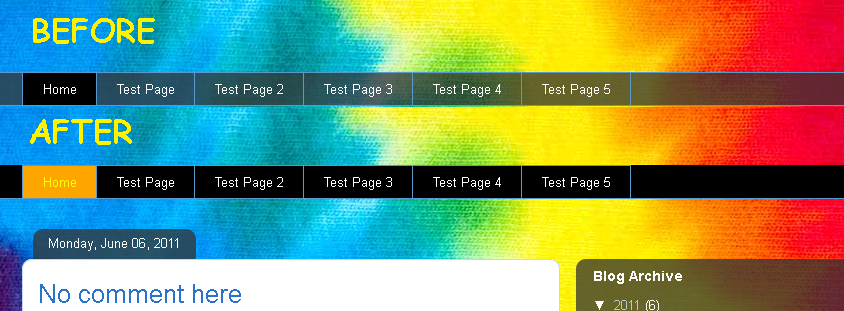
Changing Blogger Pages Gadget Background and Text Color
No update for 3 weeks, can you actually believe this guy? Anyways, here I am. I've been really tied up due to work and assignments. I've been replying all the contact-form questions though. Which brings me to this week's post. Blog reader Skaerf asked if there is a way to change the background or/and text color of the pages gadget. Yeap, there is. Let's cut to the chase shall we?

Saturday, May 21, 2011
Blogger Fixed Length Date Format
If you choose your date to show in this format --> "Thursday, January 20, 2011", the length of this field will vary for different dates. For example, compare "Wednesday, September 14, 2011" and "Friday, May 6, 2011". In this tutorial, I'll show you how you can easily alter the date format to show in a fixed length size.

Why does it matter? It doesn't. I spent hours to come up with this solution, and self-taught some Java to myself along the process. Answers like these are too good not to be shared here. Well, that and you get a fixed size for your date field, something that might help you shape your template in your own way.

Why does it matter? It doesn't. I spent hours to come up with this solution, and self-taught some Java to myself along the process. Answers like these are too good not to be shared here. Well, that and you get a fixed size for your date field, something that might help you shape your template in your own way.
Sunday, May 15, 2011
Blogger Post Title Changes Color on Post Page
In some of the designer templates, the post titles will have a different appearance in post pages, when compared to the post titles in the homepage. Often, the title's font is smaller and has plain font color. In some templates, the font is completely different.

Why is it so? Well, it is made that way. Nothing is wrong with it. But you can make the post titles in post pages look like the ones in the homepage, easily.

Why is it so? Well, it is made that way. Nothing is wrong with it. But you can make the post titles in post pages look like the ones in the homepage, easily.
Sunday, May 1, 2011
Remove Blogger Sidebar and Maximize Main Width on Selected Pages
This one is a famous request in Blogger Help Forum - how to hide the sidebar on one of the static pages, and make the main blog show in full width in that page, and in that page alone. Usually, I'd give a personalize solution for each asker, as each one of them had different blog with different template that had different settings. Today, I finally took the time to generalize this tweak. Anyone can use the solution in this page, and you'll get what you want - refer to the title, I'm not gonna repeat what this tutorial does. Or maybe I will. You get to hide your sidebars (doesn't matter left, right or both) and use that space to widen your main posting area, on pages that you choose. You can apply this tweak both on your static pages and/or your post pages (the page that loads when you click on the title of your posts).

Click here for a live demo.
Did I mention that this is a one-step tutorial?

Click here for a live demo.
Did I mention that this is a one-step tutorial?
Subscribe to:
Posts (Atom)